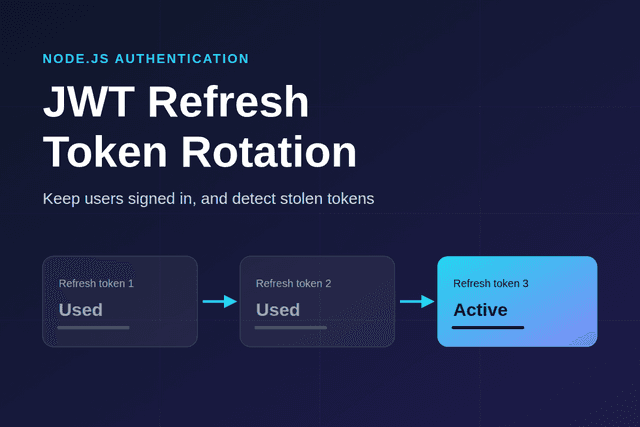
Refresh token rotation replaces a user's refresh token every time it is used. If an attacker steals one, your API can spot it being used twice and end the session. In this guide you will build it in Node.js and Express with short-lived JWT access tokens, httpOnly cookies and reuse detection.
All the code below was run on Node.js 24, Express 5.3 and jsonwebtoken 9.0.3, including the attack scenario. New to the runtime? Start with what Node.js is and how it works.
Why JWT Access Tokens Need Refresh Tokens
A JWT is valid until it expires, and you can't easily cancel one early. That creates a trade-off. A long expiry means a stolen token keeps working for a long time. A short expiry means users keep getting logged out.
The usual answer is to use two tokens:
- Access token: a JWT that lasts about 15 minutes. The client sends it with API requests, and your server verifies it without a database lookup.
- Refresh token: a long-lived random string, stored in an httpOnly cookie. It does one job, which is getting a new access token. Your server can revoke it at any time.
A refresh token doesn't have to be a JWT. Because your server has to look it up anyway, a random string is simpler and carries no readable data.
What is Refresh Token Rotation?
Without rotation, one refresh token works for its entire lifetime, often weeks. Anyone who copies it can quietly stay logged in as that user, and you have no way to notice.
With rotation, each refresh token works only once. Using it returns a new access token and a new refresh token. All the tokens from one login form a family. If a used token ever appears again, two parties must hold it, so the server revokes the whole family.
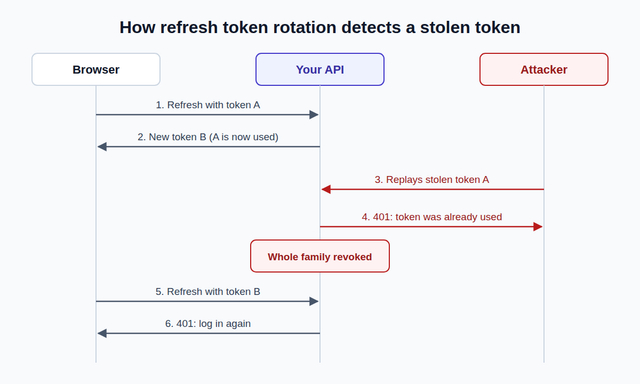
The server can't tell which party is the real user, so it logs out both. The real user signs in again, and the attacker has nothing left. The OAuth security best practice, RFC 9700, describes this same approach for public clients.
Step 1: Set Up the Project
Create a project and install the dependencies:
mkdir refresh-token-demo && cd refresh-token-demo
npm init -y
npm pkg set type=module
npm install express cookie-parser jsonwebtoken
Generate a signing secret and keep it out of your code:
node -e "console.log(require('crypto').randomBytes(64).toString('hex'))"
Save the result in a .env file as ACCESS_TOKEN_SECRET, and add that file to .gitignore.
Step 2: Create and Rotate the Tokens
Put the token logic in tokens.js:
import crypto from "node:crypto";
import jwt from "jsonwebtoken";

const ACCESS_SECRET = process.env.ACCESS_TOKEN_SECRET;
const REFRESH_TTL_MS = 7 * 24 * 60 * 60 * 1000;

// Replace this Map with Redis or a database table in production
const refreshTokens = new Map();

const hash = (token) => crypto.createHash("sha256").update(token).digest("hex");

export const signAccessToken = (userId) =>
  jwt.sign({}, ACCESS_SECRET, { subject: userId, expiresIn: "15m", algorithm: "HS256" });

export const verifyAccessToken = (token) =>
  jwt.verify(token, ACCESS_SECRET, { algorithms: ["HS256"] });

export const issueRefreshToken = (userId, familyId = crypto.randomUUID()) => {
  const token = crypto.randomBytes(32).toString("base64url");
  refreshTokens.set(hash(token), {
    userId,
    familyId,
    expiresAt: Date.now() + REFRESH_TTL_MS,
    usedAt: null,
  });
  return token;
};

export const revokeFamily = (familyId) => {
  for (const [key, record] of refreshTokens) {
    if (record.familyId === familyId) refreshTokens.delete(key);
  }
};

export const rotateRefreshToken = (token) => {
  const record = refreshTokens.get(hash(token));
  if (!record) return { error: "invalid" };

  // An already-used token means two parties hold it, so end the whole session
  if (record.usedAt) {
    revokeFamily(record.familyId);
    return { error: "reused" };
  }

  if (record.expiresAt < Date.now()) {
    revokeFamily(record.familyId);
    return { error: "expired" };
  }

  record.usedAt = Date.now();
  return {
    userId: record.userId,
    accessToken: signAccessToken(record.userId),
    refreshToken: issueRefreshToken(record.userId, record.familyId),
  };
};

export const logout = (token) => {
  const record = refreshTokens.get(hash(token));
  if (record) revokeFamily(record.familyId);
};
Four details here matter:
- Only hashes are stored. If your database leaks, the attacker gets hashes they can't use as tokens. SHA-256 is fine here because the tokens are long and random, unlike passwords.
- The algorithm is pinned. Passing
algorithms: ["HS256"]means tokens signed some other way are rejected, includingalg: none. - Used tokens stay in the store. Rotation only marks them as used. Deleting them would make a replay look like an unknown token, and reuse detection would never run.
- Each login gets its own family. A theft on one device doesn't log out the user's other devices.
Step 3: Add the Express Routes
Create server.js. The client keeps the access token in memory, while the refresh token stays in a cookie:
import express from "express";
import cookieParser from "cookie-parser";
import {
  issueRefreshToken,
  logout,
  rotateRefreshToken,
  signAccessToken,
  verifyAccessToken,
} from "./tokens.js";

const app = express();
app.use(express.json());
app.use(cookieParser());

const REFRESH_COOKIE = "refreshToken";
const cookieOptions = {
  httpOnly: true,
  secure: process.env.NODE_ENV === "production",
  sameSite: "strict",
  path: "/auth",
  maxAge: 7 * 24 * 60 * 60 * 1000,
};

// Demo only: look the user up in your database and compare a hashed password
const verifyUser = async (email, password) =>
  email === "demo@example.com" && password === "demo-password" ? { id: "user_1" } : null;

const requireAuth = (req, res, next) => {
  const token = req.headers.authorization?.replace("Bearer ", "");
  try {
    req.userId = verifyAccessToken(token).sub;
    next();
  } catch {
    res.status(401).json({ message: "Invalid or expired access token" });
  }
};

app.post("/auth/login", async (req, res) => {
  const user = await verifyUser(req.body.email, req.body.password);
  if (!user) return res.status(401).json({ message: "Wrong email or password" });

  res.cookie(REFRESH_COOKIE, issueRefreshToken(user.id), cookieOptions);
  res.json({ accessToken: signAccessToken(user.id) });
});

app.post("/auth/refresh", (req, res) => {
  const result = rotateRefreshToken(req.cookies[REFRESH_COOKIE] ?? "");
  if (result.error) {
    res.clearCookie(REFRESH_COOKIE, { path: "/auth" });
    return res.status(401).json({ message: "Please log in again" });
  }

  res.cookie(REFRESH_COOKIE, result.refreshToken, cookieOptions);
  res.json({ accessToken: result.accessToken });
});

app.post("/auth/logout", (req, res) => {
  logout(req.cookies[REFRESH_COOKIE] ?? "");
  res.clearCookie(REFRESH_COOKIE, { path: "/auth" });
  res.sendStatus(204);
});

app.get("/profile", requireAuth, (req, res) => {
  res.json({ userId: req.userId });
});

app.listen(process.env.PORT || 3000, () => console.log("API running"));
The cookie settings do a lot of the security work:
httpOnlystops JavaScript from reading the cookie, which protects it from XSS theft.securesends it over HTTPS only in production.sameSite: "strict"keeps it off cross-site requests, which is your main CSRF defense here.path: "/auth"means it travels only to the auth routes, and not with every API call.
If your frontend and API are on different sites, a strict cookie won't be sent at all. You would then need sameSite: "none" with secure, plus proper protection from the OWASP CSRF guide.
Step 4: Test Reuse Detection
The important test is the attack itself, so save this as demo-client.js. It logs in, rotates once, then replays the old token as an attacker would:
const API = process.env.API_URL || "http://localhost:3000";

const cookieFrom = (res) => res.headers.get("set-cookie")?.split(";")[0];

const refresh = (cookie) =>
  fetch(`${API}/auth/refresh`, { method: "POST", headers: { cookie } });

const login = await fetch(`${API}/auth/login`, {
  method: "POST",
  headers: { "Content-Type": "application/json" },
  body: JSON.stringify({ email: "demo@example.com", password: "demo-password" }),
});
const firstCookie = cookieFrom(login);
const { accessToken } = await login.json();

const profile = await fetch(`${API}/profile`, {
  headers: { Authorization: `Bearer ${accessToken}` },
});
console.log("Profile:", profile.status);

const rotated = await refresh(firstCookie);
const secondCookie = cookieFrom(rotated);
console.log("Refresh:", rotated.status);

const replay = await refresh(firstCookie);
console.log("Replay old token:", replay.status);

const afterReplay = await refresh(secondCookie);
console.log("Newest token after replay:", afterReplay.status);
Start the API in one terminal and run the client in another:
node --env-file=.env server.js
node demo-client.js
You should see this output:
Profile: 200
Refresh: 200
Replay old token: 401
Newest token after replay: 401
The last line is the one that proves it. The newest token was valid a moment ago, but the replay revoked its whole family.
Step 5: Avoid False Logouts in the Frontend
Rotation has one common trap. If a page sends two refresh requests at once, both carry the same token. The second looks like reuse, and the user gets logged out for no good reason. The fix is to let only one refresh run at a time:
let refreshing = null;

const refreshAccessToken = () => {
  refreshing ??= fetch("/auth/refresh", { method: "POST", credentials: "include" })
    .then((res) => {
      if (!res.ok) throw new Error("Session ended");
      return res.json();
    })
    .finally(() => {
      refreshing = null;
    });
  return refreshing;
};
Every caller shares the same request, so the token is only sent once. If you have several browser tabs, they can still race each other. Some teams handle that by accepting a used token for a few seconds after rotation, but that window weakens detection, so keep it very short if you add one.
Moving to Production
- Replace the Map. It is lost on restart and isn't shared between servers. Use Redis or a database, with an expiry matching the token lifetime. This comparison of Redis and databases for short-lived data applies here too.
- Make "mark as used" atomic. With several servers, two requests could both read the token as unused. Use one atomic operation, such as a conditional database update or a Redis Lua script.
- Limit your login and refresh routes. Slow down password guessing with rate limiting in Node.js with Redis.
- Log reuse events. A replay can mean real theft, so record it and consider alerting the user.
- Revoke sessions on password change. Revoke every family for that user, so a stolen session can't survive a reset.
- Replace the demo login. Look users up in your database and hash passwords with a slow algorithm such as Argon2 or bcrypt.
For wider guidance, read the OWASP session management guide.
Frequently Asked Questions (FAQs)
Should refresh tokens be JWTs?
They don't need to be. Your server has to look a refresh token up to rotate or revoke it, so a JWT's self-contained data adds little. A long random string is simpler and reveals nothing if it leaks.
Where should I store the access token?
Keep it in memory, such as a JavaScript variable, and get a new one after a page reload by calling the refresh route. Avoid localStorage, because any XSS bug on your site could read it.
How long should tokens last?
A common starting point is 15 minutes for access tokens and 7 to 30 days for refresh tokens. Use shorter lifetimes for sensitive apps such as banking or admin tools.
Does refresh token rotation stop XSS attacks?
No. It limits the damage from a stolen token, but an XSS attack can still make requests from the victim's browser. You still need input handling and a Content Security Policy.
Why does refresh token rotation log out the real user?
When a used token reappears, the server can't tell whether the attacker or the user sent it. Revoking the whole family is the only safe choice, and signing in again is a small cost.
Conclusion
Refresh token rotation turns a stolen token from a silent, long-term problem into one your API detects the next time both parties use it. You now have short-lived JWT access tokens, single-use refresh tokens in secure cookies, and family revocation that you have seen work against a replay. Next, move the token store to Redis and add rate limiting to your auth routes.