Every public API eventually meets a client that sends too many requests. Sometimes it is a bot hammering your login route, sometimes a buggy frontend stuck in a retry loop, and sometimes a single user with a script. Without rate limiting, one noisy client can slow down or take down the API for everyone else.
In this guide you will add rate limiting to a Node.js and Express API using Redis. We start with the quickest production-ready setup, then build our own fixed window and sliding window limiters so you understand exactly what happens under the hood. If you are new to Node.js, read What is Node.js? Complete Beginner's Guide first.
What Is API Rate Limiting?
Rate limiting caps how many requests a client can make in a given time window, for example 100 requests per 15 minutes per IP address. When a client goes over the limit, the server stops processing its requests and answers with HTTP status 429 Too Many Requests until the window allows more traffic.
Rate limiting helps you:
- Stop brute-force attacks on login, OTP and password reset routes.
- Protect expensive endpoints such as search, file uploads, or AI calls that cost real money.
- Keep the API fair so one client cannot use up resources everyone shares.
- Absorb traffic spikes from scrapers and misbehaving integrations.
Why Use Redis for Rate Limiting?
The simplest limiter keeps a counter in memory inside your Node.js process. That works on one server, but it breaks as soon as you scale:
- With 3 instances behind a load balancer, each instance keeps its own counter, so a client effectively gets 3x the limit.
- Every deploy or crash resets the counters to zero.
- Serverless functions do not keep memory between invocations at all.
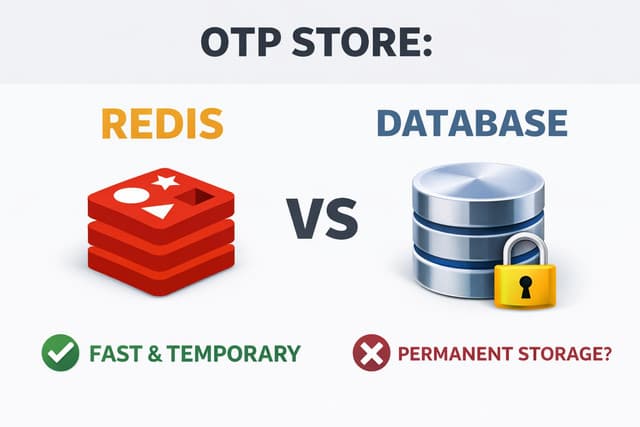
Redis solves this. It is one shared, in-memory store that all instances talk to. Its commands like INCR are atomic, and keys can expire automatically with a TTL. That is the same reason Redis works so well for short-lived data such as OTP codes, which I covered in Redis vs Database for OTP Storage.
Project Setup
Create a new project and install Express plus a Redis client. You also need a running Redis server. Locally, the quickest way is Docker.
mkdir rate-limit-demo && cd rate-limit-demo
npm init -y
npm install express ioredis redis express-rate-limit rate-limit-redis

# start Redis locally
docker run -d --name redis -p 6379:6379 redis:7
Add "type": "module" to your package.json so you can use import syntax.
Option 1: express-rate-limit with a Redis Store
For most projects, this is all you need. express-rate-limit handles the middleware logic, and rate-limit-redis stores the counters in Redis so every instance shares them.
import express from 'express'
import { createClient } from 'redis'
import { rateLimit } from 'express-rate-limit'
import { RedisStore } from 'rate-limit-redis'

const client = createClient({ url: process.env.REDIS_URL ?? 'redis://localhost:6379' })
await client.connect()

const apiLimiter = rateLimit({
  windowMs: 15 * 60 * 1000, // 15 minutes
  limit: 100,               // 100 requests per window per IP
  standardHeaders: 'draft-7',
  legacyHeaders: false,
  store: new RedisStore({
    sendCommand: (...args) => client.sendCommand(args),
  }),
})

const app = express()
app.use('/api', apiLimiter)

app.get('/api/hello', (req, res) => res.json({ message: 'Hello!' }))

app.listen(3000, () => console.log('API running on http://localhost:3000'))
When a client goes over 100 requests, it gets a 429 response along with standard RateLimit headers that tell it how long to wait. That is it: you now have a distributed rate limiter.
Option 2: Build a Fixed Window Rate Limiter
To really understand rate limiting, let's build one ourselves. The fixed window algorithm is the simplest:
- Build a key from the client and the current window, for example
rl:203.0.113.7:28467312. - Increment the key with
INCR. - If it is the first request in the window, set a TTL so the key cleans itself up.
- If the count is above the limit, return
429.
Running INCR and EXPIRE as two separate calls has a subtle bug: if your process crashes between them, the key never expires and the client is blocked forever. A small Lua script runs both commands atomically inside Redis:
// fixedWindow.js
import Redis from 'ioredis'

const redis = new Redis(process.env.REDIS_URL ?? 'redis://localhost:6379')

redis.defineCommand('fixedWindow', {
  numberOfKeys: 1,
  lua: `
    local count = redis.call('INCR', KEYS[1])
    if count == 1 then
      redis.call('EXPIRE', KEYS[1], ARGV[1])
    end
    return count
  `,
})

export function fixedWindowLimiter({ limit = 100, windowSec = 60 } = {}) {
  return async (req, res, next) => {
    const window = Math.floor(Date.now() / 1000 / windowSec)
    const key = `rl:fixed:${req.ip}:${window}`

    try {
      const count = await redis.fixedWindow(key, windowSec)
      const resetSec = windowSec - (Math.floor(Date.now() / 1000) % windowSec)

      res.set('RateLimit-Limit', String(limit))
      res.set('RateLimit-Remaining', String(Math.max(0, limit - count)))
      res.set('RateLimit-Reset', String(resetSec))

      if (count > limit) {
        res.set('Retry-After', String(resetSec))
        return res.status(429).json({ message: 'Too many requests, please try again later.' })
      }
      next()
    } catch (err) {
      // Fail open: if Redis is down, don't take the whole API down with it
      console.error('Rate limiter error:', err)
      next()
    }
  }
}
This is fast, needing only one Redis round trip per request, and uses very little memory. But it has a well-known weakness.
The Problem with Fixed Windows
Counters reset at the window boundary. A client can send the full limit at the very end of one window and the full limit again at the start of the next, which means double the allowed traffic in a short burst.
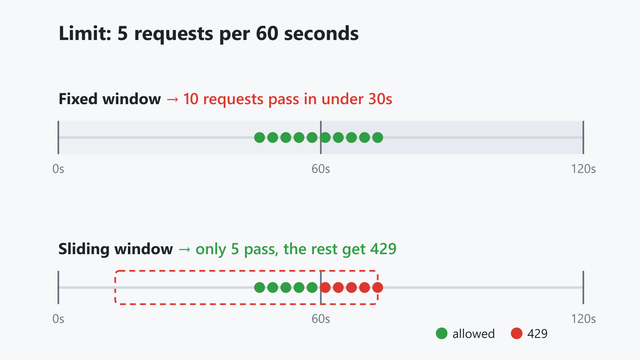
For a public read endpoint, this is usually fine. For a login route, it means an attacker gets twice as many password guesses. That is where the sliding window comes in.
Option 3: Sliding Window Rate Limiter with Redis Sorted Sets
The sliding window log algorithm stores a timestamp for every request in a Redis sorted set. For each new request we:
- Remove timestamps older than the window with
ZREMRANGEBYSCORE. - Count what is left with
ZCARD. - If we are under the limit, add the current request with
ZADD. Otherwise, reject it.
Again, we wrap it in Lua so that check-then-add is atomic. Without that, two parallel requests could both see "4 of 5" and both get through.
// slidingWindow.js
import Redis from 'ioredis'
import { randomUUID } from 'node:crypto'

const redis = new Redis(process.env.REDIS_URL ?? 'redis://localhost:6379')

redis.defineCommand('slidingWindow', {
  numberOfKeys: 1,
  lua: `
    local key    = KEYS[1]
    local now    = tonumber(ARGV[1])
    local window = tonumber(ARGV[2])
    local limit  = tonumber(ARGV[3])

    redis.call('ZREMRANGEBYSCORE', key, 0, now - window)
    local count = redis.call('ZCARD', key)

    if count < limit then
      redis.call('ZADD', key, now, ARGV[4])
      redis.call('PEXPIRE', key, window)
      return {1, limit - count - 1, 0}
    end

    local oldest = redis.call('ZRANGE', key, 0, 0, 'WITHSCORES')
    return {0, 0, tonumber(oldest[2]) + window - now}
  `,
})

export function slidingWindowLimiter({ limit = 5, windowMs = 60_000, keyPrefix = 'rl:sliding' } = {}) {
  return async (req, res, next) => {
    const key = `${keyPrefix}:${req.ip}`

    try {
      const [allowed, remaining, retryAfterMs] = await redis.slidingWindow(
        key, Date.now(), windowMs, limit, randomUUID()
      )

      res.set('RateLimit-Limit', String(limit))
      res.set('RateLimit-Remaining', String(remaining))

      if (!allowed) {
        res.set('Retry-After', String(Math.ceil(retryAfterMs / 1000)))
        return res.status(429).json({ message: 'Too many requests, please try again later.' })
      }
      next()
    } catch (err) {
      console.error('Rate limiter error:', err)
      next()
    }
  }
}
Now apply a strict limit to sensitive routes and a relaxed one everywhere else:
import express from 'express'
import { fixedWindowLimiter } from './fixedWindow.js'
import { slidingWindowLimiter } from './slidingWindow.js'

const app = express()
app.set('trust proxy', 1) // required behind Nginx, Vercel, Render, etc.
app.use(express.json())

// Generous limit for the whole API
app.use('/api', fixedWindowLimiter({ limit: 300, windowSec: 60 }))

// Strict limit for login: 5 attempts per minute
app.post(
  '/api/auth/login',
  slidingWindowLimiter({ limit: 5, windowMs: 60_000, keyPrefix: 'rl:login' }),
  (req, res) => res.json({ ok: true })
)

app.listen(3000)
The sliding window is accurate, with no boundary bursts, but it stores one entry per request, so it uses more memory. Use it for low-limit, high-value routes and keep the fixed window for high-volume traffic.
Fixed Window vs Sliding Window: Which Should You Use?
- Fixed window: 1 counter per client, very fast and cheap. Allows bursts of up to 2x the limit at window edges. Best for general API traffic.
- Sliding window log: exact limits, no bursts. Memory grows with the limit, so it is best for small limits on login, OTP, signup and password reset.
- Token bucket: allows controlled bursts while keeping an average rate. Great for public developer APIs, and a good next algorithm to explore.
Testing Your Rate Limiter
Fire 7 requests at the login route and watch the last two fail:
for i in 1 2 3 4 5 6 7; do
  curl -s -o /dev/null -w "%{http_code}\n" -X POST http://localhost:3000/api/auth/login
done

# 200 200 200 200 200 429 429
You can also look at the keys directly with redis-cli: run KEYS rl:* to find your keys, then ZRANGE to see every request timestamp in the current window.ZRANGE rl:login:::1 0 -1 WITHSCORES shows every timestamp in the current window.lt;keyZRANGE rl:login:::1 0 -1 WITHSCORES shows every timestamp in the current window.gt; 0 -1 WITHSCORES
Production Best Practices
- Set
trust proxycorrectly. Behind a reverse proxy,req.ipis the proxy's IP unlessapp.set('trust proxy', 1)is configured, and every user ends up sharing one limit. - Limit by user, not just IP. For authenticated routes, use the user ID or API key as the identifier. Many users can share one IP on mobile networks and offices.
- Decide fail-open vs fail-closed. The examples above fail open so a Redis outage does not take down the API. For login and OTP routes, you might prefer to fail closed.
- Always send
Retry-Afterso well-behaved clients know when to retry instead of hammering you. - Prefix your keys (
rl:login:,rl:api:) so limits for different routes never collide. - Add a limit at the edge too. Nginx, Cloudflare or your API gateway can drop obvious floods before they ever reach Node.js.
Frequently Asked Questions
What HTTP status code should a rate limiter return?
Return 429 Too Many Requests, ideally with a Retry-After header that tells the client how many seconds to wait before trying again.
Can I do rate limiting in Node.js without Redis?
Yes. express-rate-limit uses an in-memory store by default, which is fine for a single server. Once you run more than one instance or deploy to serverless, you need a shared store like Redis so all instances see the same counts.
Is the fixed window or the sliding window algorithm better?
Neither is strictly better. Fixed window is cheaper and fine for general traffic. Sliding window is exact and better for sensitive routes like login and OTP verification where bursts matter.
Does rate limiting stop DDoS attacks?
Not on its own. Application-level rate limiting protects against abuse from individual clients, but a large distributed attack should be stopped earlier, at a CDN, WAF or load balancer, before it reaches your server.
Conclusion
Rate limiting is one of the cheapest and most effective ways to protect a Node.js API. Start with express-rate-limit and a Redis store for most routes, then add a sliding window limiter to sensitive endpoints like login and OTP. With Redis behind it, the limits hold no matter how many instances you run.
If you are building AI-powered backends, rate limiting matters even more, because every request can cost money. Check out How to Build an MCP Server with Node.js and TypeScript next.